Tweet Overview
View this X/Twitter post from @itsPaulAi published on 29 июля 2025 г. в 20:48. This post contains 3 videos and 1 images.
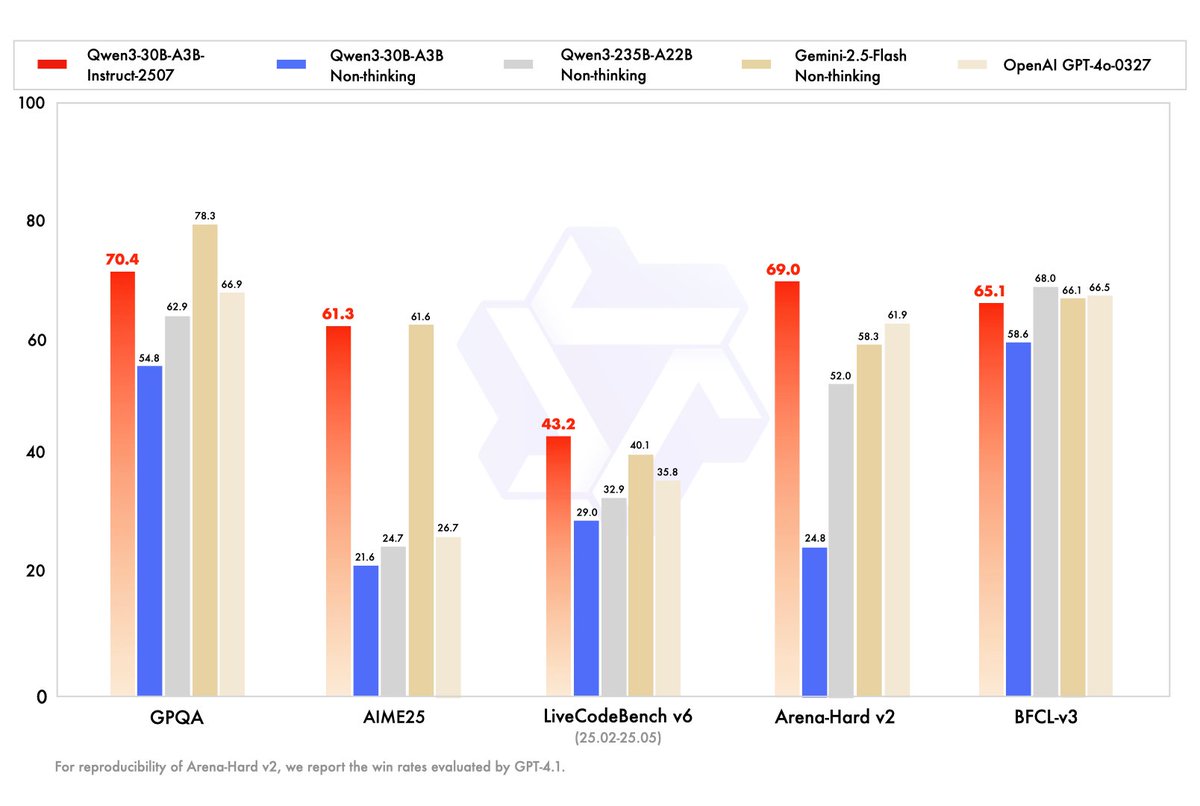
Qwen has just released a model on par with GPT-4o...

And you can run it locally easily 🤯

Yep. GPT-4o level AI running offline on a laptop.

- Fully open source
- Only 3B active parameters
- 262k context length natively

Quick steps to run it on your machine and details below
1. Download LM Studio and the model

- Install LM Studio for your OS (macOS, Windows, Linux)
- In the search tab type "Qwen3 30B A3B 2507"

I highly recommend the versions quantized by Unsloth, especially those marked "UD".

They're REALLY efficient. E.g.: Q4_K_XL Qwen3 30B A3B Instruct 2507 UD

Then just click on the download button.
2. Load the model

- Open the chat tab
- Select the model you've downloaded in the list
- Adjust the context length if you want
- Change the default parameters in the sidebar to:

  * Temperature=0.7
  * TopP=0.8
  * TopK=20
  * MinP=0

And you're good to go!
Useful links:

- Try the model on Qwen Chat (non-locally): https://chat.qwen.ai/?model=Qwen3-30B-A3B-2507
- Hugging Face: https://huggingface.co/Qwen/Qwen3-30B-A3B-Instruct-2507
- LM Studio: https://lmstudio.ai/

Again... GPT-4o level but 100% locally on a laptop. That's just crazy when you think about it.